Technical SEO audits you run in Claude Code

Eleven modules you drop into Claude Code. You give it a URL or a Search Console export, it runs the audits in order and ends on what to watch over time.

It all runs on your own computer, on your files. No paid SEO tool to add.

claude · ~/sites/my-siterunning

>run the audit workflow on my-site.com

Skill audit-workflow loaded

Site scoping: sitemap, business pages, sector

Indexing: 214 URLs run through the nine checks

Cannibalization: queries firing two URLs or more

Internal linking: pillars, hubs, orphan pages

Core Web Vitals: mobile Lighthouse on a sample

full-audit.md

The biggest problems first, then what to keep watching.

>

claude · ~/sites/my-siterunning

>indexing audit of my-site.com, the list is in sitemap.xml

Skill indexing-check loaded

HTTP status and redirect chain

robots.txt: no Disallow on the path

noindex in the HTML and in X-Robots-Tag

Sitemap: URL present, lastmod freshness

Inbound links: orphan and under-linked pages

Content length: thin content under 300 words

indexing-report.md

Critical first, minor after, fixes ranked.

>

claude · ~/sites/my-siterunning

>Core Web Vitals audit of https://my-site.com/sitemap.xml

Skill core-web-vitals loaded

Sitemap fetched, index files and language versions

URL sample drawn from the sitemap

Lighthouse on mobile, three workers in parallel

LCP, CLS and TBT measured URL by URL

Problems that repeat across the site, grouped

cwv-report.md

Scores per URL and a plan for the five worst pages.

>

claude · ~/sites/my-siterunning

>cannibalization audit, the GSC export is in ./gsc-queries-pages.csv

Skill cannibalization-audit loaded

Queries that fire two URLs or more

Type: exact keyword, intent, proximity, SERP triad

Position, impressions, clicks and CTR for each page

Role of each page: pillar or satellite

Call: 301, merge, differentiate, or nothing

cannibalization-report.md

Never a 301 before looking at both pages' numbers.

>

claude · ~/sites/my-siterunning

>internal linking plan from ./gsc-pages.csv

Skill internal-linking-gsc loaded

Pages and Queries exports read URL by URL

Parent pages: position 4 to 15, transactional query

Under-linked pages: good position, low CTR

Parent, child, grandchild yesterdayarchy

Urgency score: impressions, upside, business value

linking-plan-gsc.md

Source page, target page, anchor, the sentence it sits in.

>

The six modules, one by one

Each module states what it takes in, what it checks and what it hands back. Click one to see the session it starts.

All your Google data in one place, nothing more to pay for

Search Console
Keyword Planner
YouTube
Lighthouse
Analytics
Trends

Claude Code · your notes

Search Console exports, Lighthouse measurements and validated markup land in the same place: Claude Code, and your notes.

Your dashboard

organikk.co/en/agent-seo

Hello

Kit installation
1of 3 setup steps
Your next stepRun the audit workflow
Continue
2/10modules runindexing and workflow
10modules installedin ~/.claude/skills/
90daysof WhatsApp6 days a week
49KBthe archivetechnical-seo-agent.zip
Where to start

Run the audit workflow on a site of yours. It scopes the site, runs the other modules in order and ends on monitoring.

Download the archive and run the installerDone
02Run the audit workflow on a site of yoursTo do
organikk.co/en/agent-seo

Install

The archive holds the six main modules, the workflow that chains them, and three more modules that use the same data.

technical-seo-agent.zip47 KB · eleven modules
Download the archive
unzip technical-seo-agent.zip -d technical-seo-agentcd technical-seo-agent./install.sh
Nothing is deleted during the install

If a folder already carries one of the module names, the old version is moved aside with a dated suffix. You can run the install again without overwriting what you had.

Check everything is in place

In Claude Code, type /skills. If the ten module names show up, the install is good.

organikk.co/en/agent-seo

The modules

Each module is a folder with a SKILL.md file. Claude Code reads that file to know when to use it. The ten files are written in French.

00
Audit and alerting workflowaudit-workflow
Run
01
Indexing auditindexing-check
Run
02
Core Web Vitals auditcore-web-vitals
Lighthouse + jq
03
JSON-LD structured datastructured-data
The site's code
04
Internal linking, the structureinternal-linking
A URL
05
Linking from Search Consoleinternal-linking-gsc
GSC export
06
Cannibalization auditcannibalization-audit
GSC export
07
Quick winsquick-wins
GSC export
08
Pre-audit from a URLpre-audit
A URL
09
GEO auditgeo-audit
A text
organikk.co/en/agent-seo

Obsidian

Point Claude Code at your Obsidian folder: the reports become files you re-read, and it searches your notes before answering.

01
Install Claude CodeOne command, then you launch it from a folder.
02
Create the folder that holds everythingOne folder per site, or a single one for all your work.
03
Create the Obsidian folder inside itObsidian opens that folder, Claude Code works in the same place.
04
Set the raw/ + wiki/ ruleSources on one side, your own notes on the other.
05
Check it worksYou ask a question, it cites the files it read.
organikk.co/en/agent-seo

WhatsApp

Direct, 6 days a week, for 90 days. Same number I use for my retainer clients.

Message me directlyanswer within 24 h, 6 days a week
What you can send me

A report you cannot read, an anomaly that keeps coming back, a module instruction to adjust, or a question about the order to take your site in.

What I send back

What your report shows, where to start, and the exact instruction to type into Claude Code next.

The same data, on three accounts we run

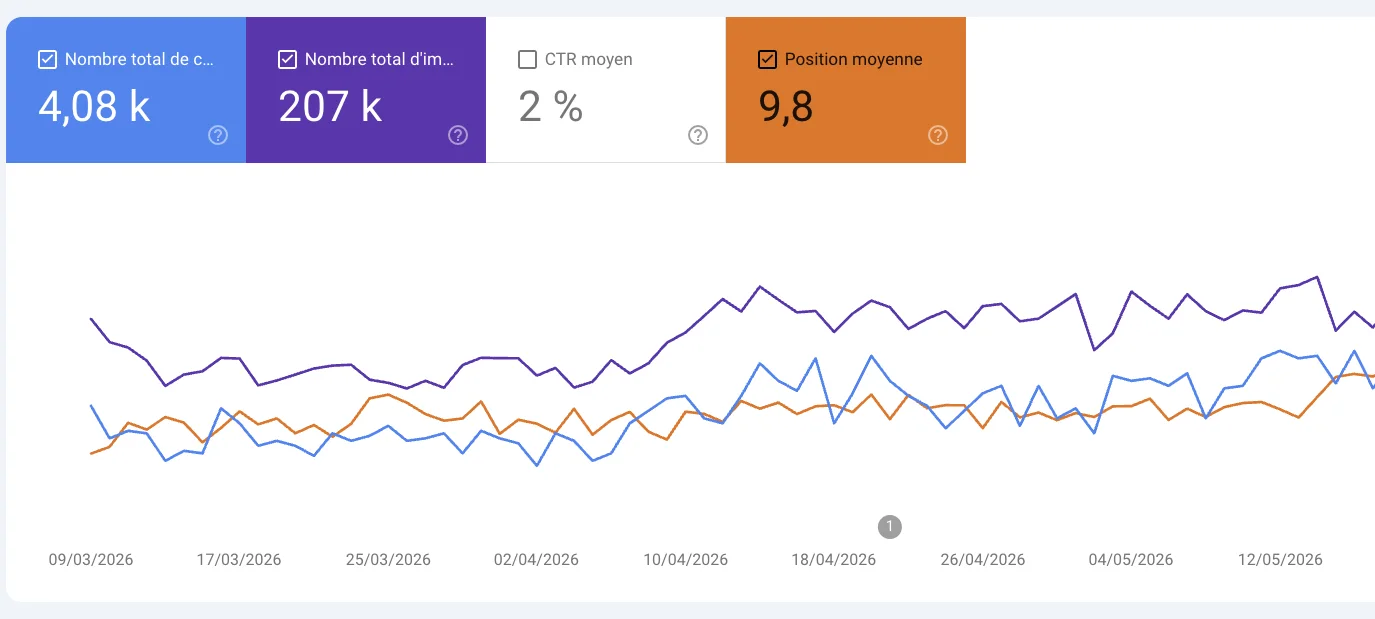
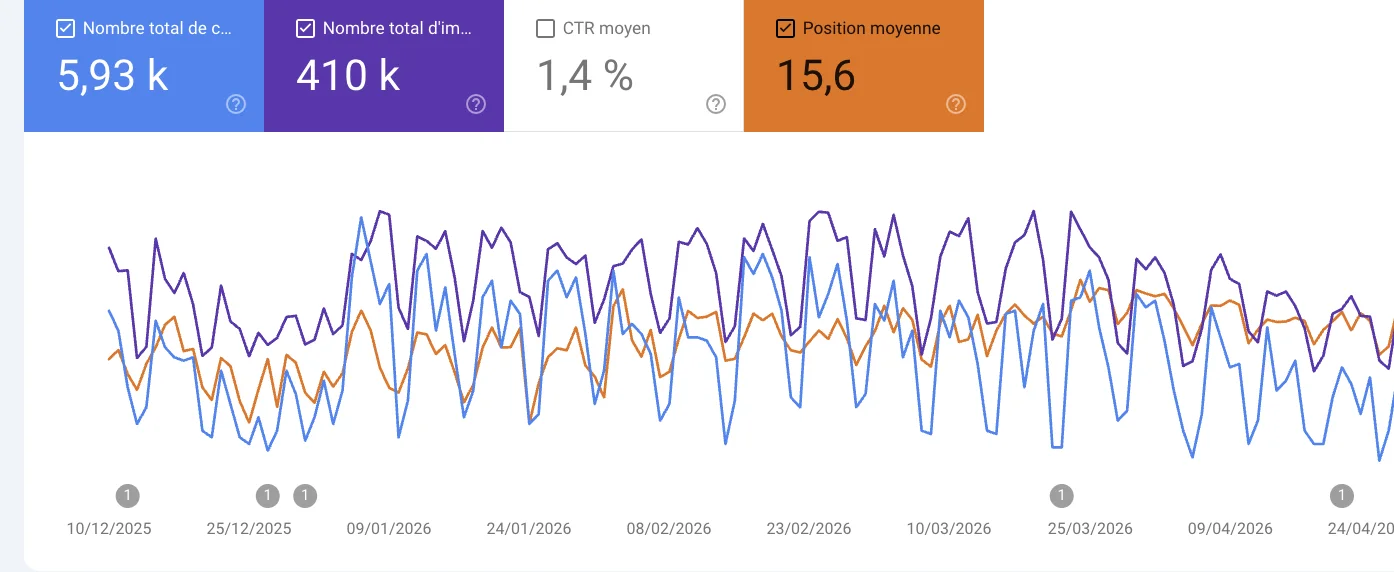
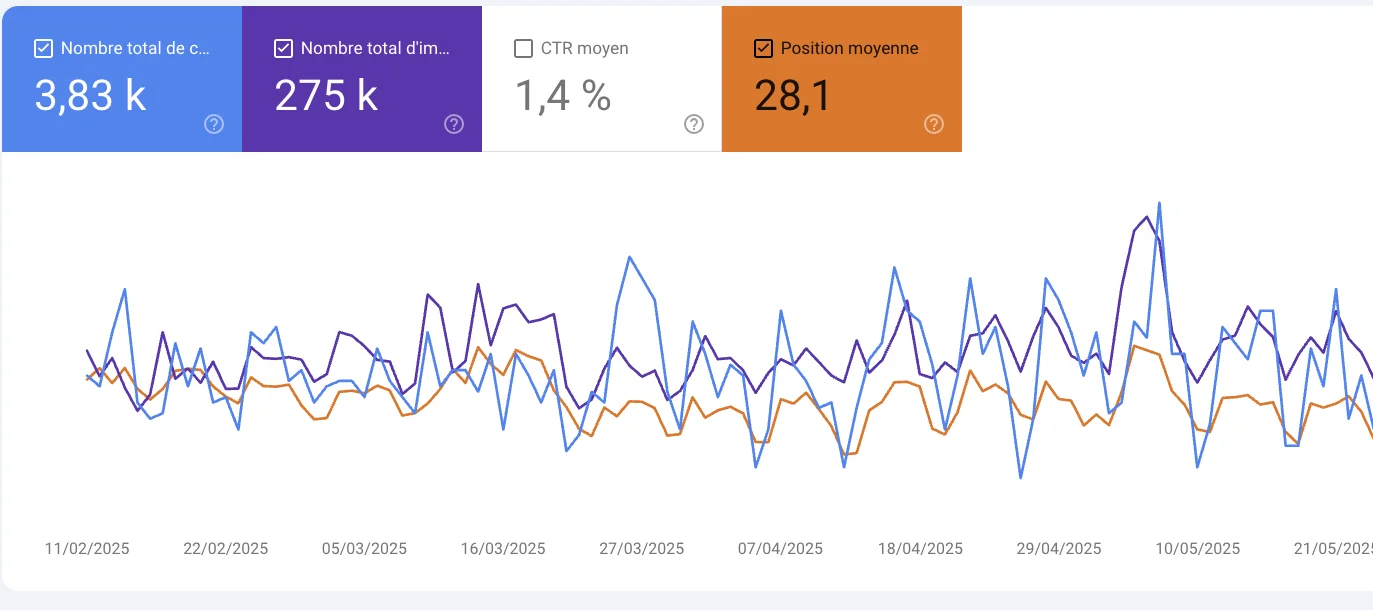
Three Search Console accounts of sites we follow. Raw screenshots of the Performance tab, untouched, French interface. Two of the six modules take that data in to produce a linking plan or a cannibalization audit.

Search Console over 3 months: 4.08k clicks and 207k impressions.
3 months · 4.08k clicks, 207k impressionsAverage position 9.8, both curves rise over the period.
Search Console over 6 months: 5.93k clicks and 410k impressions.
6 months · 5.93k clicks, 410k impressionsAverage position 15.6, the impression volume is there.
Search Console: 3.83k clicks and 275k impressions.
3.83k clicks, 275k impressionsAverage position 28.1: the upside sits on page two.

From download to first report

  1. 01

    You download the ZIP

    One folder, the eleven modules inside. Nothing else to install, no account to create.

  2. 02

    You hand it to your Claude

    You unzip it into your skills folder. Claude Code picks up each module at the next launch, with no configuration.

  3. 03

    You run an audit

    You type the audit you want. The report comes out in two tabs, summary and technical analysis: you read the summary, you fix, you run it again.

  4. 04

    Lifetime updates

    Every new version of the modules is sent to you. You replace the folder, nothing else to redo.

No subscription.

One folder to copy into your skills. As many times as you like, no quota.

The sitemap is public, Lighthouse is free, the Search Console export is yours.

What it is not
  • A tool that writes your pages for you.
  • A subscription, with an account to create.
  • An audit with invented numbers: if a figure cannot be measured, it says so instead of guessing.
99199 €

Pre-launch price. One payment, the eleven modules, updates included. Full price is €199.

  • Indexing audit, 9 checks per URL
  • Core Web Vitals on a mobile sample
  • JSON-LD structured data derived from the content
  • Internal linking from the structure
  • Internal linking from Search Console
  • Cannibalization audit
  • The workflow that chains the six
  • Quick wins, pre-audit, GEO audit
  • The space and the install guide
  • The Obsidian setup with me
  • 90 days of 1:1 WhatsApp, 6 days a week
Get the kit